Real-Time Object Detection in Flutter at 30 FPS: Native C++, libyuv and TensorFlow Lite GPU
Running a detector on every camera frame in Flutter at 30 FPS: libyuv in C++ for YUV to RGB, native rotation and scaling, a GPU to NNAPI to CPU fallback on Android and Swift + Metal on iOS. First published June 2025, updated November 2026.
First published June 2, 2025. Updated November 2026 with what changed in production: stride-aware YUV unpacking, rotation in native code, a GPU → NNAPI → CPU fallback on Android, and a Swift path on iOS.
Many camera apps need to know, while recording, where a person is in the frame. That means running a person detector on every camera frame, live, inside a Flutter app, without dropping frames or heating the phone. This post explains how to build that pipeline: the camera formats you actually get, why to convert in native code with libyuv, how to pick a TensorFlow Lite delegate, and what changes on iOS.
The problem: 33 ms per frame, in the wrong pixel format
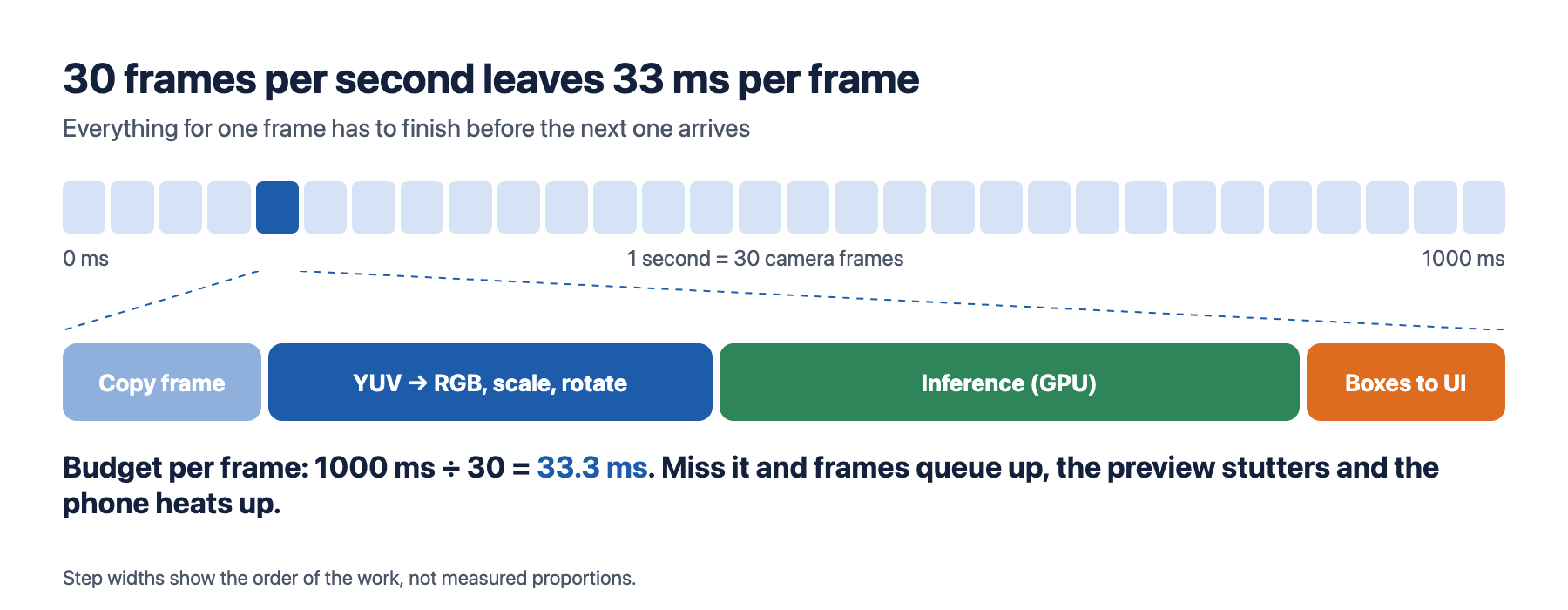
At 30 frames per second, one frame has 1000 ÷ 30 ≈ 33.3 ms to be copied, converted, run through the model and drawn. Anything slower queues frames up: the preview stutters, latency grows, and the phone warms up.
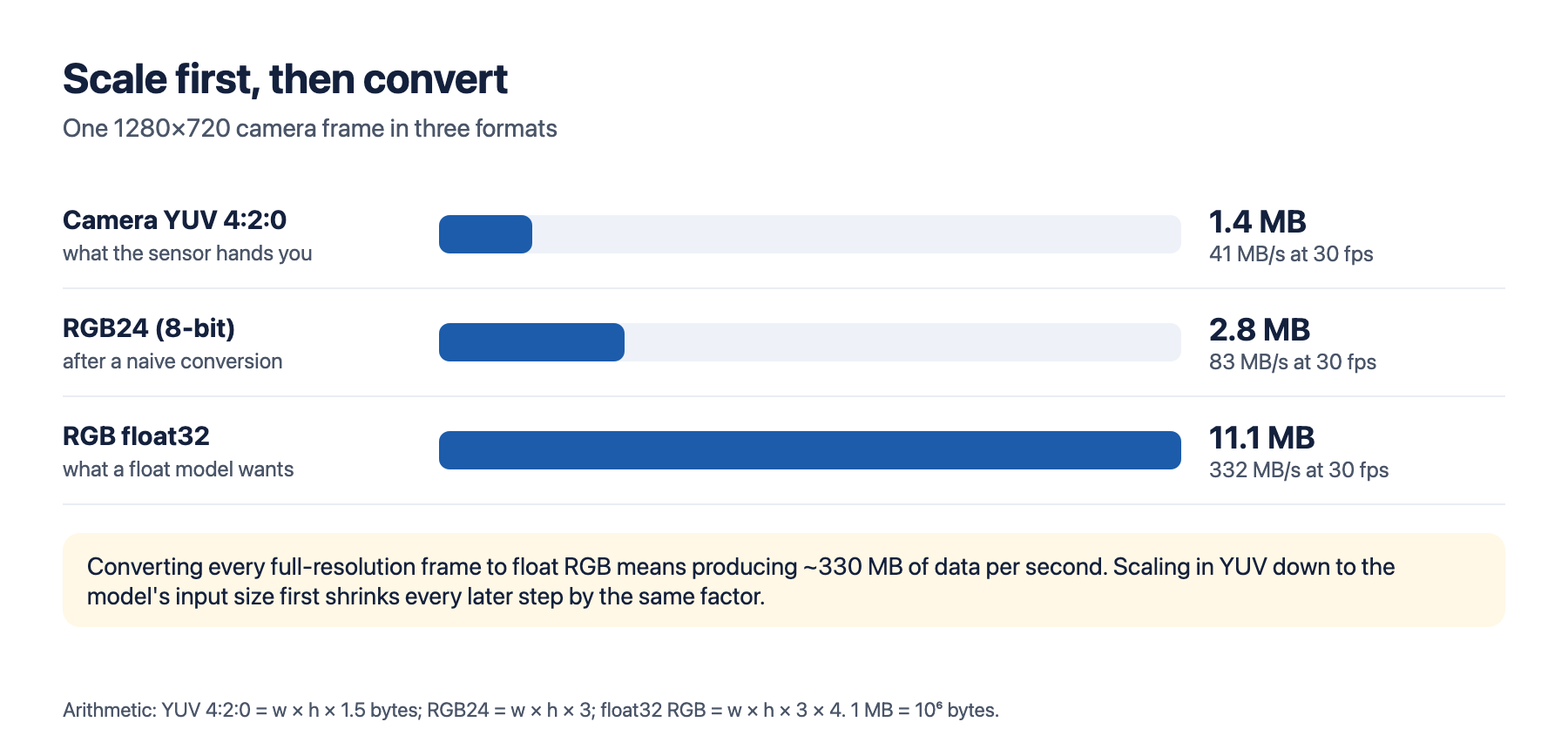
The second problem is the format. Android cameras deliver YUV_420_888: a full-resolution luma (Y) plane and two quarter-resolution chroma planes (U, V), with row strides and, depending on the device, interleaved chroma (a pixel stride of 2). A detection model wants interleaved RGB, usually as float32. That conversion is where a naive implementation spends its budget.
In 2025 our first version did the conversion in Kotlin/Java and allocated new arrays per frame. It was too slow, and the allocations caused garbage-collection pauses that showed up as visible stutter. Two rules came out of that and still hold: do pixel work in native code, and never allocate per frame.
Why not a ready-made Flutter plugin?
In May 2025 we tried Ultralytics' YOLO Flutter package first. It had a detection preview running within a couple of hours, which made it a good demo tool. We needed finer control of the camera than the package offered at the time, so we built our own camera and detection layer. It took about three days to get right. The package has been updated since; check its current features before you decide either way.
The Android pipeline today
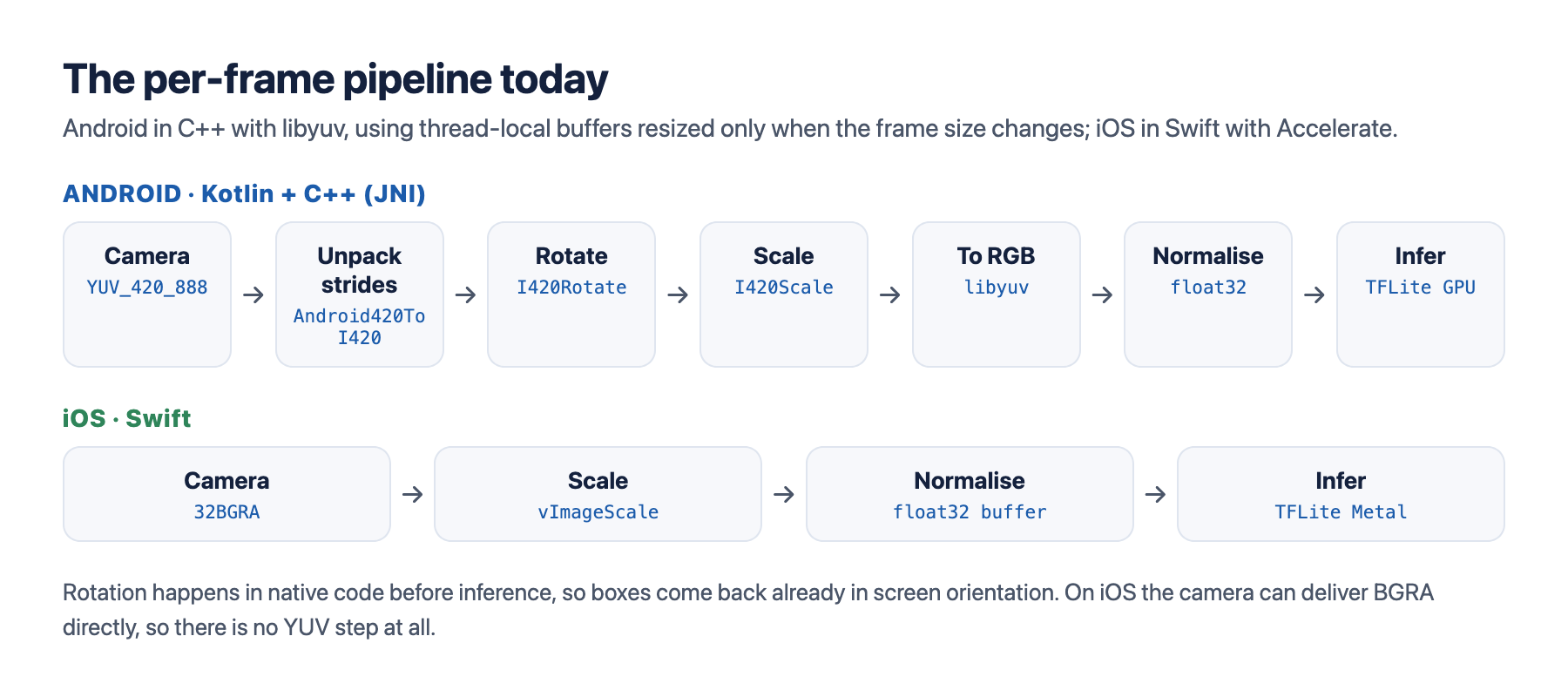
The camera frame goes from Kotlin to C++ through JNI as the three plane buffers plus their strides. In C++, libyuv does every pixel operation with SIMD:
- Unpack strides with
Android420ToI420. It handles any row stride and both planar and interleaved chroma, so the rest of the pipeline sees a clean I420 image on every device. Our 2025 code assumed planar chroma. On devices that report a chroma pixel stride of 2, every other U byte was really a V byte: the converted image kept its brightness and shapes but lost all of its colour. De-interleaving once at the start fixed it, and we skip the step when the planes are already planar. - Rotate with
I420Rotateso the image is upright before the model sees it, and the boxes come back in screen orientation. - Scale with
I420Scale(bilinear) down to the model's input size, while the image is still YUV and small. - Convert to 8-bit RGB, then normalise to float32 directly into the interpreter's input buffer.
A simplified version of that sequence (error handling and the size-change checks left out):
#include <libyuv.h>
#include <vector>

// Allocated once per thread, resized only when the frame or model size changes.
static thread_local std::vector<uint8_t> y, u, v, yr, ur, vr, ys, us, vs, rgb;

void preprocess(const uint8_t* srcY, int strideY, const uint8_t* srcU, int strideU,
                const uint8_t* srcV, int strideV, int pixelStrideUV,
                int w, int h, libyuv::RotationMode rot,
                int dstW, int dstH, float* input /* model input tensor */) {
  const int cw = (w + 1) / 2, ch = (h + 1) / 2;
  y.resize(w * h); u.resize(cw * ch); v.resize(cw * ch);

  // 1. Any Android YUV_420_888 layout -> planar I420
  libyuv::Android420ToI420(srcY, strideY, srcU, strideU, srcV, strideV, pixelStrideUV,
                           y.data(), w, u.data(), cw, v.data(), cw, w, h);

  // 2. Rotate so the image is upright (90/270 swap width and height)
  const bool swap = rot == libyuv::kRotate90 || rot == libyuv::kRotate270;
  const int rw = swap ? h : w, rh = swap ? w : h, rcw = (rw + 1) / 2, rch = (rh + 1) / 2;
  yr.resize(rw * rh); ur.resize(rcw * rch); vr.resize(rcw * rch);
  libyuv::I420Rotate(y.data(), w, u.data(), cw, v.data(), cw,
                     yr.data(), rw, ur.data(), rcw, vr.data(), rcw, w, h, rot);

  // 3. Scale down while still YUV
  const int scw = (dstW + 1) / 2, sch = (dstH + 1) / 2;
  ys.resize(dstW * dstH); us.resize(scw * sch); vs.resize(scw * sch);
  libyuv::I420Scale(yr.data(), rw, ur.data(), rcw, vr.data(), rcw, rw, rh,
                    ys.data(), dstW, us.data(), scw, vs.data(), scw, dstW, dstH,
                    libyuv::kFilterBilinear);

  // 4. YUV -> R,G,B bytes (libyuv "RAW"), then float32 in [0, 1]
  rgb.resize(dstW * dstH * 3);
  libyuv::I420ToRAW(ys.data(), dstW, us.data(), scw, vs.data(), scw,
                    rgb.data(), dstW * 3, dstW, dstH);
  for (int i = 0; i < dstW * dstH * 3; ++i) input[i] = rgb[i] / 255.0f;
}
Two details worth knowing. First, libyuv names formats by their order in a little-endian word, not in memory: RGB24 is stored as B, G, R and RAW as R, G, B. If your model was trained on RGB, use I420ToRAW (or swap the channels yourself); a swapped image still "works", it just quietly costs accuracy. Second, rotating before scaling means the scaler always receives an upright image and the scale target is simply the model's input size.
Rotation
The rotation comes from the sensor orientation and the display rotation. For the back camera:
val rotation = (sensorOrientation - displayRotationDegrees + 360) % 360For the front camera the display rotation is added instead of subtracted, and the image is mirrored. Getting this wrong doesn't crash anything: the detector simply sees sideways people and finds fewer of them, so test every orientation on real devices.
Picking a TensorFlow Lite delegate on Android
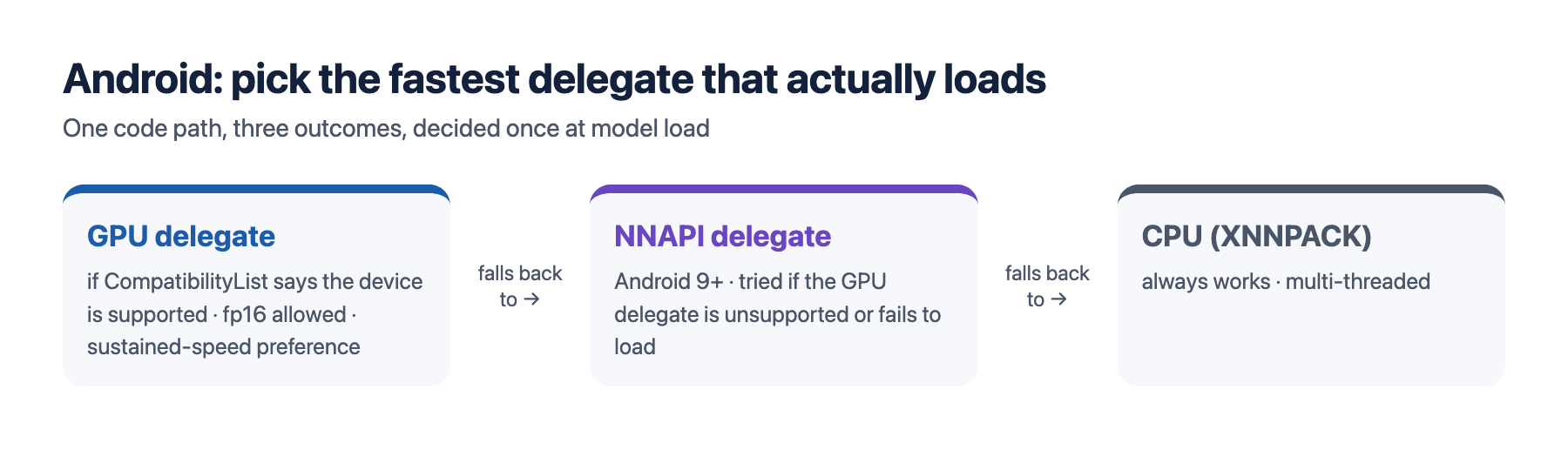
In 2025 we simply added the GPU delegate. On a wide range of Android devices that isn't enough: some GPUs aren't supported, and some fail at load time. The loader now tries each option in order and keeps the first one that loads:
fun loadInterpreter(model: MappedByteBuffer, cpuThreads: Int): Interpreter {
    if (CompatibilityList().isDelegateSupportedOnThisDevice) {
        try {
            val gpu = GpuDelegate(GpuDelegate.Options().apply {
                setPrecisionLossAllowed(true)  // fp16 math on the GPU
                setInferencePreference(GpuDelegateFactory.Options.INFERENCE_PREFERENCE_SUSTAINED_SPEED)
            })
            return Interpreter(model, Interpreter.Options().addDelegate(gpu).setNumThreads(1))
        } catch (t: Throwable) { /* fall through */ }
    }
    if (Build.VERSION.SDK_INT >= Build.VERSION_CODES.P) {
        try {
            return Interpreter(model, Interpreter.Options().addDelegate(NnApiDelegate()).setNumThreads(1))
        } catch (t: Throwable) { /* fall through */ }
    }
    return Interpreter(model, Interpreter.Options().setNumThreads(cpuThreads))  // XNNPACK
}
We ask for sustained speed rather than the fastest single answer because the detector runs back to back for the whole recording. Log which delegate each device ends up with; it explains most "slow on my phone" reports.
iOS: a Swift path instead of shared C++
The 2025 version of this post predicted we would reuse the same C++ on iOS through Flutter FFI. We didn't. On iOS, AVCaptureVideoDataOutput can deliver frames as kCVPixelFormatType_32BGRA, so there is no YUV step to share. The iOS pipeline is a Swift port: Accelerate's vImageScale_ARGB8888 resizes the BGRA buffer, a short loop writes the float32 RGB input, and TensorFlow Lite runs with the Metal delegate. Fewer steps, no JNI-style bridge, and the same model and output handling as Android.
What we would tell ourselves in 2025
- Handle every YUV layout from day one. Use
Android420ToI420instead of assuming planar chroma, or some devices will give you colourless images. - Check the byte order your model expects. libyuv's
RGB24is B,G,R in memory;RAWis R,G,B. - Scale in YUV, convert last. The float tensor is the largest object in the pipeline; make it as small as the model allows.
- Allocate once. Thread-local buffers that resize only when the size changes remove per-frame garbage collection.
- Rotate in native code, before inference. Boxes then come back in screen coordinates and the UI never has to transform them.
- Treat the GPU delegate as optional. Check compatibility, fall back to NNAPI and then CPU, and log the result.
- Don't force code sharing. The best pipeline on iOS starts from a different pixel format, so a native port was simpler than shared C++.
Questions
How do you convert YUV_420_888 to RGB fast on Android? Pass the three planes and their strides to C++ through JNI and use libyuv: Android420ToI420 to normalise the layout, I420Scale to shrink it, then I420ToRAW for R,G,B bytes (I420ToRGB24 gives B,G,R). libyuv uses SIMD and is far faster than per-pixel Kotlin or Java.
Can Flutter run TensorFlow Lite on the GPU in real time? Yes. Run the camera and the interpreter in native code (Kotlin/C++ on Android, Swift on iOS) with the GPU or Metal delegate, and send only the detections to Flutter. That keeps the Dart side out of the per-frame path.
What if the GPU delegate fails on a device? Check CompatibilityList first, catch load failures, and fall back to NNAPI (Android 9+) and then the CPU with XNNPACK.
Do I need libyuv on iOS? Usually not. Ask AVFoundation for 32BGRA frames and resize with Accelerate's vImage.
Related: the OSNet ReID CPU benchmark. Step Doctor itself: gait analysis from a phone video.