Build an MCP Server in Python: YOLO11 Object Detection as an Agent Tool, and What MCP Really Costs
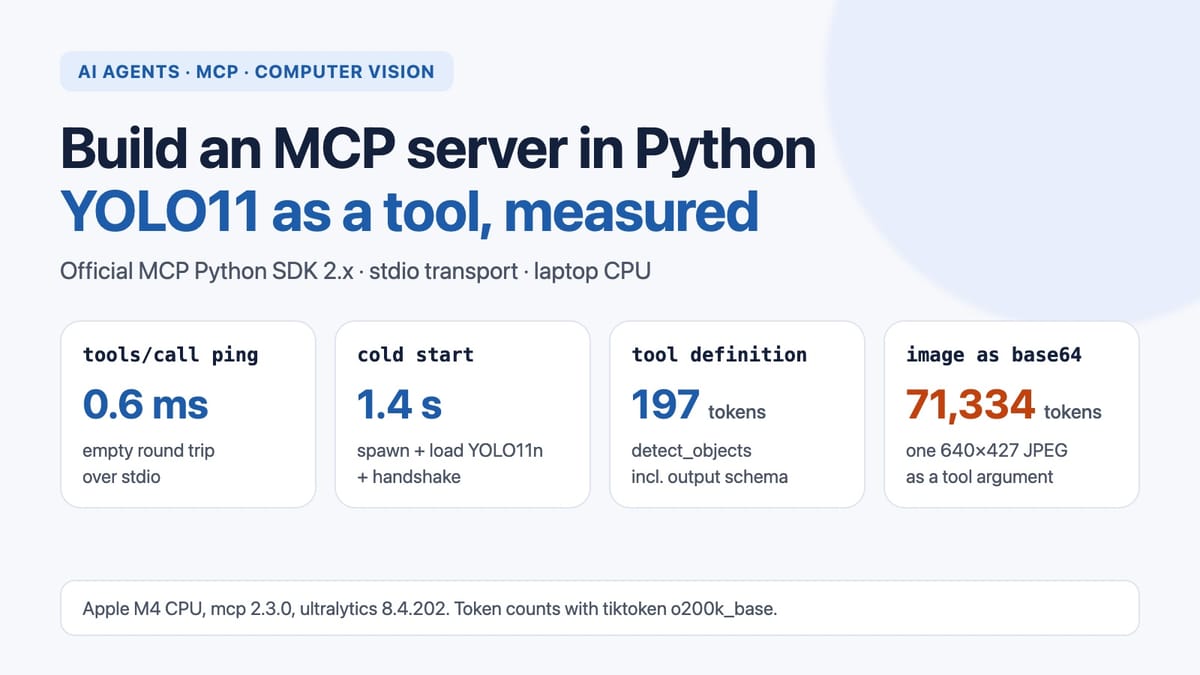
How do you build an MCP server, and what does it cost? We expose YOLO11 detection as MCP tools with the official Python SDK 2.x, then measure stdio overhead (0.6 ms), cold start (1.4 s) and why a base64 image as a tool argument costs 71,000+ tokens.
Most searches that reach our earlier post The Four Faces of AI Agents and the Rise of MCP ask a practical question: how do you actually build an MCP server, and what does it cost? This post answers that with code. We wrap a computer-vision model, YOLO11 object detection, as an MCP tool using the official Python SDK, call it from a client over stdio, and measure three things: how much time the protocol adds, what happens when you send images as base64 instead of file paths, and how many tokens the tool puts into a model's context.
Everything below runs on a laptop CPU with public weights. Every number comes from the scripts on this page (Apple M4, 16 GB RAM, macOS 26.6.2, Python 3.12.14, mcp 2.3.0, ultralytics 8.4.202, PyTorch 2.15.0).
Short version:
- An empty MCP round trip over stdio took 0.61–0.69 ms (median). A YOLO11n detection took 23–39 ms whether we called it directly or through MCP. The differences were smaller than the run-to-run noise.
- Starting the server (spawn the process, import PyTorch, load YOLO, handshake) took 1.4–1.5 s. Start it once and keep it running.
- Base64 images cost almost nothing in time, but a 640×427 JPEG as a base64 string is 71,334 tokens. The tool definition is 197 tokens and a detection result is 84–131. Send paths or URLs to the model and keep pixels out of its context.
MCP in one paragraph
The Model Context Protocol is JSON-RPC between a client (inside an AI app such as an IDE assistant or a chat app) and a server that offers tools, resources and prompts. The client asks the server for its tools (tools/list). It shows the tool names, descriptions and JSON Schemas to the language model. When the model decides to use a tool, the client sends tools/call with the arguments the model wrote and passes the result back to the model. For a local server the usual transport is stdio: the client starts the server as a subprocess and they exchange newline-delimited JSON over stdin and stdout. Two things follow from this. The model only ever sees text (definitions, arguments, results). And everything heavy, such as the YOLO weights, lives in the server process.
Setup
python -m venv .venv && source .venv/bin/activate
pip install "mcp>=2" ultralytics
# only for the benchmark and figures:
pip install tiktoken scikit-image matplotlib
A version trap first. Most MCP tutorials online start with from mcp.server.fastmcp import FastMCP. With mcp 2.x installed, that line fails:
ModuleNotFoundError: No module named 'mcp.server.fastmcp'. This is mcp 2.x, where FastMCP
was renamed to MCPServer (from mcp.server.mcpserver import MCPServer) and other APIs changed;
see the migration guide ... or pin 'mcp<2' to keep running v1 code.
The class you want is now MCPServer. The decorator style is the same. If you follow an older tutorial, either pin mcp<2 or change the import. The standalone fastmcp package on PyPI is a separate project with its own API, so don't mix the two.
The server: YOLO11 as three tools
yolo_mcp_server.py:
import base64
import os

import cv2
import numpy as np
from mcp.server.mcpserver import MCPServer  # mcp 1.x: from mcp.server.fastmcp import FastMCP
from mcp.server.mcpserver.exceptions import ToolError  # message reaches the model
from ultralytics import YOLO

WEIGHTS = os.environ.get("YOLO_WEIGHTS", "yolo11n.pt")
ALLOWED_DIR = os.path.realpath(os.environ.get("YOLO_IMAGE_DIR", "."))

mcp = MCPServer("yolo-detect")
model = YOLO(WEIGHTS)  # loaded once, when the server process starts
model(np.zeros((64, 64, 3), np.uint8), verbose=False)  # warm-up


def _detect(img_bgr: np.ndarray, conf: float) -> list[dict]:
    res = model(img_bgr, conf=conf, verbose=False)[0]
    return [
        {"label": res.names[int(c)], "confidence": round(float(p), 3),
         "box_xyxy": [round(v, 1) for v in b]}
        for c, p, b in zip(res.boxes.cls.tolist(), res.boxes.conf.tolist(), res.boxes.xyxy.tolist())
    ]


@mcp.tool()
def detect_objects(image_path: str, min_confidence: float = 0.25) -> list[dict]:
    """Detect objects (80 COCO classes) in an image file on the server's disk.

    Returns one entry per object: label, confidence (0-1) and box [x1, y1, x2, y2] in pixels.
    """
    path = os.path.realpath(image_path)
    if not path.startswith(ALLOWED_DIR + os.sep):
        raise ToolError(f"image_path must be inside {ALLOWED_DIR}")
    img = cv2.imread(path)
    if img is None:
        raise ToolError(f"cannot read image: {image_path}")
    return _detect(img, min_confidence)


@mcp.tool()
def detect_objects_b64(image_base64: str, min_confidence: float = 0.25) -> list[dict]:
    """Detect objects (80 COCO classes) in a base64-encoded JPEG or PNG.

    Returns one entry per object: label, confidence (0-1) and box [x1, y1, x2, y2] in pixels.
    """
    buf = np.frombuffer(base64.b64decode(image_base64), np.uint8)
    img = cv2.imdecode(buf, cv2.IMREAD_COLOR)
    if img is None:
        raise ToolError("not a decodable image")
    return _detect(img, min_confidence)


@mcp.tool()
def ping() -> str:
    """Return 'pong'. Used to measure the protocol round trip without any model work."""
    return "pong"


if __name__ == "__main__":
    mcp.run()  # stdio by default
Design choices that matter more than they look:
- The docstring is the interface. The SDK turns the function name, the docstring and the type hints into the tool definition the model reads. Say what goes in, what comes out, and the units (pixels, 0–1). The model has nothing else to go on.
- Load the model at import time, not inside the tool. The server process lives as long as the client session, so the weights load once.
- Return compact JSON, not an annotated image. The model can reason over labels and boxes. It cannot use a PNG that a client may or may not show it, and the PNG would cost far more tokens.
- Restrict paths. The arguments are written by a language model, and the text it reads (a web page, a document, an issue) can steer what it writes.
ALLOWED_DIRkeepsdetect_objectsfrom reading arbitrary files.
Calling it from a client
In practice the client is your AI app, which you point at python yolo_mcp_server.py in its MCP settings. To test without one, the SDK has a client. try_client.py:
import asyncio
import json
import sys

from mcp import Client, StdioServerParameters


async def main(image_path):
    server = StdioServerParameters(command=sys.executable, args=["yolo_mcp_server.py"])
    async with Client(server) as client:
        tools = await client.list_tools()
        for t in tools.tools:
            print(t.name, "-", t.description.splitlines()[0])
        result = await client.call_tool("detect_objects", {"image_path": image_path})
        print(json.dumps(result.structured_content, indent=1)[:800])
        print("is_error:", result.is_error)


if __name__ == "__main__":
    asyncio.run(main(sys.argv[1]))
On the scikit-image "coffee" photo (CC0, by Rachel Michetti), saved as coffee.png:
detect_objects - Detect objects (80 COCO classes) in an image file on the server's disk.
detect_objects_b64 - Detect objects (80 COCO classes) in a base64-encoded JPEG or PNG.
ping - Return 'pong'. Used to measure the protocol round trip without any model work.
{
 "result": [
  {"label": "cup", "confidence": 0.818, "box_xyxy": [170.4, 17.4, 421.1, 317.0]},
  {"label": "dining table", "confidence": 0.784, "box_xyxy": [9.7, 1.5, 598.0, 399.7]},
  {"label": "spoon", "confidence": 0.285, "box_xyxy": [324.0, 215.5, 406.7, 328.8]}
 ]
}
is_error: False
(We compacted the JSON for the page.) Because the function returns a list, the SDK wraps it as {"result": [...]} and also publishes an outputSchema, so clients get typed, structured content instead of text to parse.
Errors the model can read
Our first version raised ValueError for a bad path. The client got only this:
Error executing tool detect_objectsIn mcp 2.x, any exception other than ToolError is treated as a crash. The server logs the traceback and the model sees a generic message, so it can't correct itself. With ToolError, a call with /etc/passwd or a missing file returns is_error=True and the reason:
Error executing tool detect_objects: image_path must be inside <server folder>
Error executing tool detect_objects: cannot read image: nope.png
Raise ToolError for failures the model can fix (wrong path, unreadable file, bad argument). Let real bugs stay generic, so internal details don't leak into the conversation.
What MCP costs: the benchmark
bench_mcp.py (full script at the end) does the following:
- Cold start: 5 times, spawn the server, finish the handshake and list the tools.
- Direct baseline: the same
yolo11n.ptin the client's own process, reading the same file and calling the model. - Protocol only: 200 calls to
ping. - Path vs base64: the coffee photo resized to a long side of 640, 1280, 1920 and 3840 px and saved as JPEG (quality 90). Each size is run through
detect_objects(path) anddetect_objects_b64. - Tokens: tool definitions, results and base64 strings counted with tiktoken's
o200k_baseencoding.
Each latency is the median of 50 calls after 5 warm-up calls. We ran the whole script three times. Inference ran on the CPU, with PyTorch using its default threads.
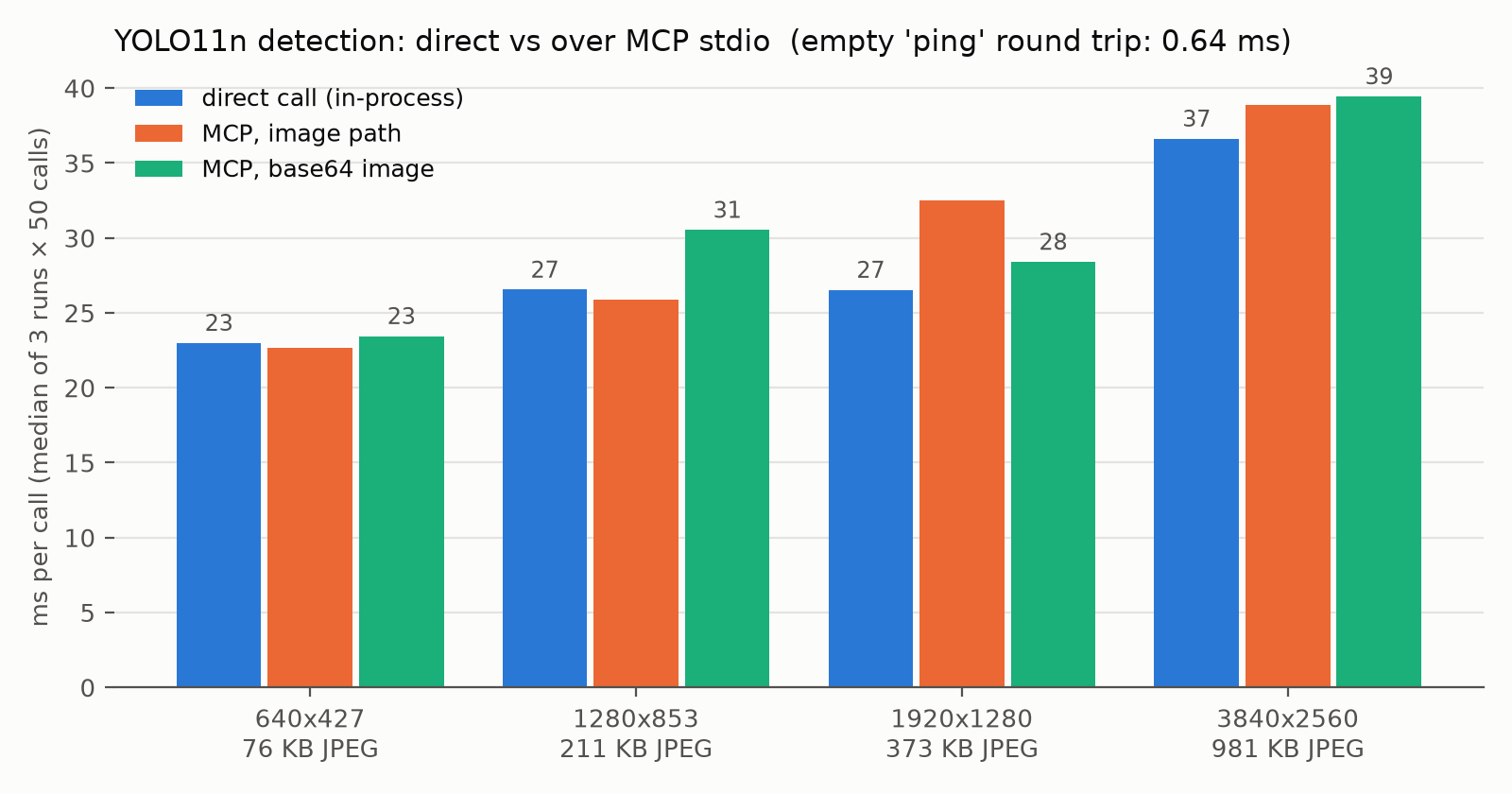
ping round trip was 0.64 ms.| Image (JPEG size) | Direct (ms) | MCP, path (ms) | MCP, base64 (ms) |
|---|---|---|---|
| 640×427 (76 KB) | 23.0 (21.6–31.9) | 22.6 (22.2–23.9) | 23.4 (23.2–25.2) |
| 1280×853 (211 KB) | 26.6 (23.6–31.5) | 25.9 (25.7–28.4) | 30.5 (24.5–35.7) |
| 1920×1280 (373 KB) | 26.5 (25.9–27.3) | 32.5 (27.5–34.6) | 28.4 (26.6–28.6) |
| 3840×2560 (981 KB) | 36.6 (35.8–36.7) | 38.9 (36.3–40.3) | 39.5 (37.6–41.2) |
Median of three run medians, with the range across the three runs in brackets.
What the numbers say:
- The protocol itself is cheap. The
pingmedians were 0.61, 0.64 and 0.69 ms in the three runs. That is serialisation, a pipe write and read, and the SDK's dispatch. Next to a 23 ms model call it is noise. In our table, MCP was sometimes faster than the direct call. That tells you how large the run-to-run variation is compared with what MCP adds. It does not mean MCP speeds anything up. - Base64 transport is not a latency problem either. Even the 1.3 MB base64 string for the 3840 px image stayed within a few ms of the path version. Most of the time growth with image size is the same in all three columns: decoding a larger JPEG and resizing it to YOLO's 640 input.
- The real fixed cost is startup: 1.41, 1.50 and 1.45 s (median of 5 cold starts per run) before the first tool list. Clients normally keep a stdio server running for the session, so you pay this once. If you write your own client, don't spawn a server per call.
Where the real cost is: tokens
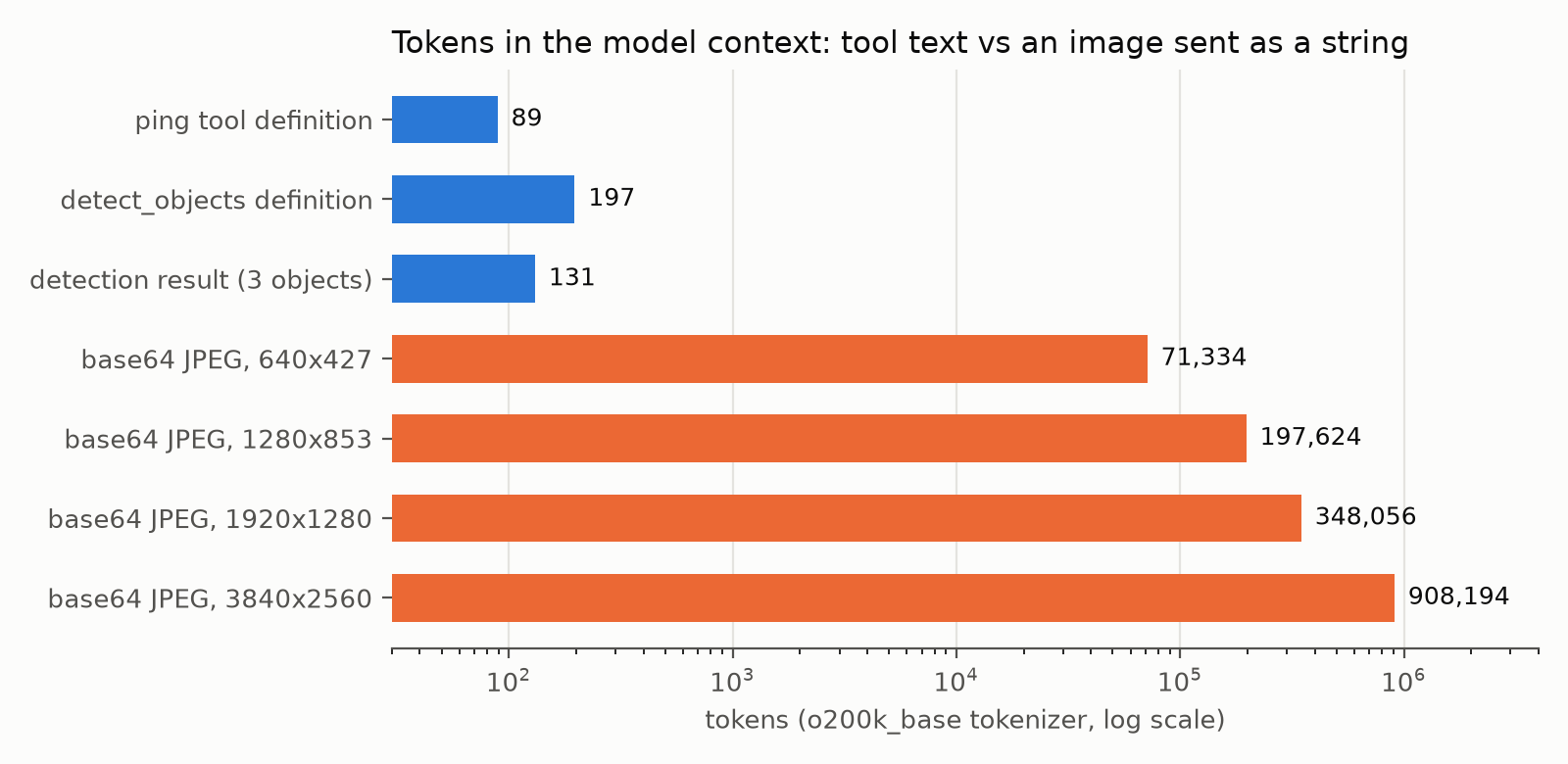
o200k_base. Other models' tokenizers give different counts, but the same orders of magnitude.- Tool definitions are small but always there.
detect_objectsis 197 tokens (689 bytes of JSON, including the generated output schema), andpingis 89. A client sends the definitions of every connected server to the model, often on every turn. At roughly 200 tokens per tool, ten servers with ten tools each would add about 20,000 tokens before the user has typed anything. Write short descriptions and remove tools nobody calls. - Results are cheap when they are structured: 84–131 tokens for two or three detections.
- A base64 image as a tool argument does not work. If the model has to write the image into
image_base64itself, the 640×427 JPEG is 71,334 output tokens, and the 3840 px one is 908,194, which is more than most context windows. Base64 inputs only make sense when your own host code fills the argument, for example a pipeline that calls MCP tools directly without a model. For agents, take a path, a URL or an ID, and let the server fetch the pixels.
One caveat on sizes. Our large images are upscaled from a 600×400 photo, and upscaled images compress better than real camera photos of the same resolution. Real photos at these resolutions will usually be larger files, so treat the base64 numbers as a lower bound.
What to do in your own server
- Use
from mcp.server.mcpserver import MCPServeronmcp2.x, or pinmcp<2for v1-era code. - Load models once at server start. Measure your own cold start; ours was about 1.4 s for YOLO11n.
- Take images by path, URL or ID, and check the input against an allow-list.
- Return compact structured JSON: labels, scores, boxes. Round the floats.
- Raise
ToolErrorwith a message the model can act on. - Keep descriptions short and accurate, and count the tokens of your definitions.
- Don't worry about stdio overhead for model-sized work. At about 0.6 ms it only matters for tools that return in microseconds and get called thousands of times.
If you want the person-tracking version of this, our OSNet ReID post shows how to turn YOLO person crops into embeddings. That would make a good second tool on the same server.
Benchmark script
"""usage: python bench_mcp.py IMAGE OUT_JSON  (run next to yolo_mcp_server.py and yolo11n.pt)"""
import asyncio, base64, json, platform, statistics, sys, time
from importlib.metadata import version

import cv2
import tiktoken
from mcp import Client, StdioServerParameters
from ultralytics import YOLO

RUNS, WARMUP, COLD_STARTS = 50, 5, 5
SIZES = [640, 1280, 1920, 3840]  # long side in pixels
ENC = tiktoken.get_encoding("o200k_base")


def ms(samples):
    return {"median": round(statistics.median(samples), 2),
            "p90": round(sorted(samples)[int(0.9 * len(samples)) - 1], 2)}


async def timed(fn, runs=RUNS):
    for _ in range(WARMUP):
        await fn()
    out = []
    for _ in range(runs):
        t0 = time.perf_counter()
        await fn()
        out.append((time.perf_counter() - t0) * 1000)
    return ms(out)


def resized_files(image):
    img = cv2.imread(image)
    files = {}
    for side in SIZES:
        scale = side / max(img.shape[:2])
        im = cv2.resize(img, None, fx=scale, fy=scale, interpolation=cv2.INTER_CUBIC)
        path = f"bench_{side}.jpg"
        cv2.imwrite(path, im, [cv2.IMWRITE_JPEG_QUALITY, 90])
        files[side] = (path, f"{im.shape[1]}x{im.shape[0]}")
    return files


async def main(image, out_json):
    report = {"versions": {"python": platform.python_version(), "mcp": version("mcp"),
                           "ultralytics": version("ultralytics"), "torch": version("torch")},
              "machine": platform.machine()}
    server = StdioServerParameters(command=sys.executable, args=["yolo_mcp_server.py"])

    cold = []  # spawn process, import, load YOLO, handshake, first tools/list
    for _ in range(COLD_STARTS):
        t0 = time.perf_counter()
        async with Client(server) as client:
            await client.list_tools()
            cold.append((time.perf_counter() - t0) * 1000)
    report["cold_start_ms"] = ms(cold)

    files = resized_files(image)
    model = YOLO("yolo11n.pt")  # direct, in-process baseline
    model(cv2.imread(files[640][0]), verbose=False)
    direct = {}
    for side, (path, _) in files.items():
        async def run_direct(p=path):
            model(cv2.imread(p), conf=0.25, verbose=False)
        direct[side] = await timed(run_direct)
    report["direct_ms"] = direct

    async with Client(server) as client:
        tools = await client.list_tools()
        defs = [t.model_dump(mode="json", by_alias=True, exclude_none=True) for t in tools.tools]
        report["tool_defs"] = {d["name"]: {"json_bytes": len(json.dumps(d)),
                                           "tokens_o200k": len(ENC.encode(json.dumps(d)))} for d in defs}
        report["ping_ms"] = await timed(lambda: client.call_tool("ping", {}), runs=200)
        rows = []
        for side, (path, wh) in files.items():
            b64 = base64.b64encode(open(path, "rb").read()).decode()
            by_path = await timed(lambda p=path: client.call_tool("detect_objects", {"image_path": p}))
            by_b64 = await timed(lambda b=b64: client.call_tool("detect_objects_b64", {"image_base64": b}))
            res = await client.call_tool("detect_objects", {"image_path": path})
            rows.append({"long_side": side, "size": wh, "jpeg_KB": round(len(b64) * 3 / 4 / 1024, 1),
                         "b64_KB": round(len(b64) / 1024, 1), "b64_tokens_o200k": len(ENC.encode(b64)),
                         "direct_ms": direct[side], "mcp_path_ms": by_path, "mcp_b64_ms": by_b64,
                         "result_tokens_o200k": len(ENC.encode(json.dumps(res.structured_content)))})
        report["by_size"] = rows
    json.dump(report, open(out_json, "w"), indent=1)


if __name__ == "__main__":
    asyncio.run(main(*sys.argv[1:3]))
References
- Model Context Protocol specification and documentation.
- MCP Python SDK (version 2.3.0 used here) and its v2 migration guide.
- Ultralytics YOLO11 documentation (public
yolo11n.ptweights). - tiktoken (
o200k_baseencoding) for token counts. - Test image: scikit-image
data.coffee(), photo by Rachel Michetti, courtesy of Pikolo Espresso Bar, CC0.